Live values
Solid 2UnstableA closer look at the glaze
Hover over the vase and a lens follows your pointer, gliding after it and settling where you stop.
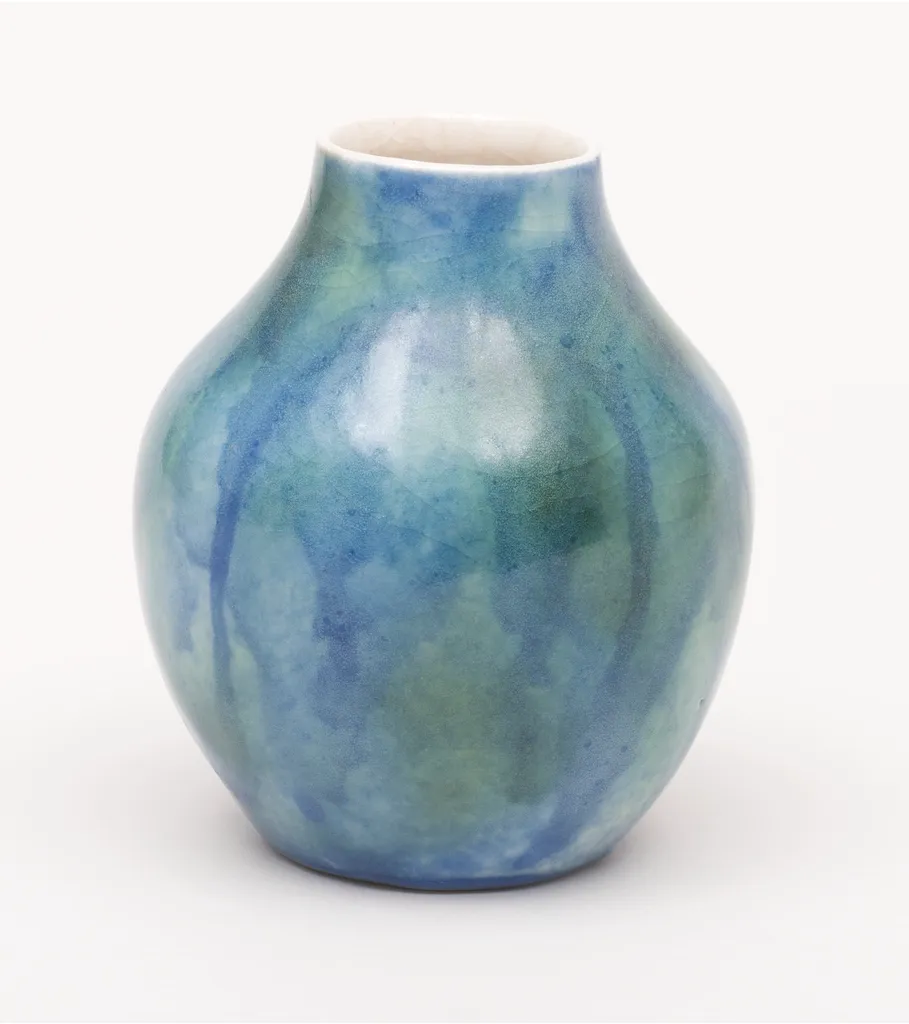
Hover over the vase to look closer, or press and drag on a phone.
Reduced motion: The lens doesn't glide: it's where the pointer is. A live value is yours, so Wardic's reduced motion leaves it alone; the demo jumps its springs to the pointer instead.
Why
A product photo hides what makes a glazed piece worth buying: where its colours run into each other. A magnifier lets you look closer without leaving the page. A lens glued to the pointer jitters with every twitch of the hand; on a spring, it glides after the pointer and settles where you stop.
The pointer's place over the photo is two plain signals. createSpring follows each with a spring on the frame loop, idle while it rests, and the lens takes the springs as its x and y in style: live values, which Wardic writes each frame. createTransform maps the same springs to where the photo inside the lens sits, as two custom properties the stylesheet's background-position reads, so the lens always shows what's under its centre.
The lens grows in under hover or a press: the photo names a variant, and the lens, a Variant child, follows it.
The photo hears the pointer from Wardic. On Solid 2, its ward only listens (ward()), given to the photo through wardRef; the photo keeps its own variants, whileHover and whileTap. An effect over look.when("hover") hears a mouse, from where it came in and at each move, and effects over look.when("pressStart") and look.when("pan") hear a finger, which never hovers: each with the photo it's over (element, so no ref). On Solid 1, the photo's own onPointerMove and onPointerDown do the same.
The code
Motion's useSpring and useTransform are createSpring and createTransform, made in the component's body. Motion joins the two values into one background-position with useMotionTemplate; Wardic has no template helper, so each maps to a custom property, and the stylesheet joins them. Motion's version hears the pointer through the photo's onPointerMove and onPointerDown, a finger's too, where Solid 2 hears it through the photo's ward: when("hover"), and when("pressStart") and when("pan") for a finger.
import { photoOf } from "@wardic/example-storefront-shared/images"
import { createSpring, createTransform, ward, type WardPointInfo, wardic } from "@wardic/solid/unstable/v2"
import { createEffect, createSignal } from "solid-js"
import { useReducedMotion } from "~/lib/preferences.tsx"

const ZOOM = 2.5
const LENS = 160

// Hover or press names a variant on the photo; the lens, a Variant child, grows in under it.
const frame = { rest: {}, looking: {} }
const lens = {
  rest: { opacity: 0, scale: 0.6 },
  looking: { opacity: 1, scale: 1, transition: { type: "spring", stiffness: 400, damping: 28 } },
} as const

export default function Magnifier() {
  const photo = photoOf("lagoon-vase")
  const reduced = useReducedMotion()
  // Where the pointer is over the photo, from its corner, and how wide the photo is drawn.
  const [pointerX, setPointerX] = createSignal(LENS)
  const [pointerY, setPointerY] = createSignal(LENS)
  const [width, setWidth] = createSignal(0)
  // The lens follows the pointer on a spring: it glides after it, and settles where it stops.
  const x = createSpring(pointerX, { stiffness: 380, damping: 32 })
  const y = createSpring(pointerY, { stiffness: 380, damping: 32 })
  // The photo inside the lens, placed so its centre shows what's under the lens, ZOOM times larger:
  // a custom property each, which the stylesheet's `background-position` reads.
  const insideX = createTransform(x, (at: number) => `${LENS / 2 - at * ZOOM}px`)
  const insideY = createTransform(y, (at: number) => `${LENS / 2 - at * ZOOM}px`)

  // The photo's ward, made here beside the effects that hear it, and given to the photo (#349). It
  // only listens: the photo's own props say when the lens shows (#398).
  const look = ward()
  // The lens, put over a point in the viewport, on the photo it's over (#397: no `ref`).
  const follow = ({ point, element }: WardPointInfo) => {
    const box = element.getBoundingClientRect()
    const atX = point.x - box.left
    const atY = point.y - box.top
    setWidth(box.width)
    setPointerX(atX)
    setPointerY(atY)
    // Under reduced motion the lens doesn't glide: it's where the pointer is.
    if (reduced()) {
      x.jump(atX)
      y.jump(atY)
    }
  }
  // A mouse over the photo, through `when` (#355): from where it came in, and at each move (#397).
  createEffect(look.when("hover"), follow)
  // A finger, which never hovers: where it pressed, then each move of its pan. The photo's
  // `touch-action: none` keeps the page from scrolling under it.
  createEffect(look.when("pressStart"), follow)
  createEffect(look.when("pan"), follow)

  return (
    <div class="magnifier">
      <wardic.div class="magnifier-photo" wardRef={look} variants={frame} initial="rest" animate="rest" whileHover="looking" whileTap="looking">
        <img src={photo.large} width={photo.width} height={photo.height} alt="The Lagoon Vase, up close" draggable={false} />
        <wardic.div
          class="lens"
          aria-hidden="true"
          variants={lens}
          style={{
            x,
            y,
            "--inside-x": insideX,
            "--inside-y": insideY,
            "--inside-size": `${width() * ZOOM}px`,
            "background-image": `url(${photo.large})`,
          }}
        />
      </wardic.div>
      <p class="muted">Hover over the vase to look closer, or press and drag on a phone.</p>
    </div>
  )
}
"use client"
import { photoOf } from "@wardic/example-storefront-shared/images"
import { motion, useMotionTemplate, useMotionValue, useReducedMotionConfig, useSpring, useTransform } from "motion/react"
import { type PointerEvent, useState } from "react"

const ZOOM = 2.5
const LENS = 160

// Hover or press names a variant on the photo; the lens, a child with variants, grows in under it.
const lens = {
  rest: { opacity: 0, scale: 0.6 },
  looking: { opacity: 1, scale: 1, transition: { type: "spring", stiffness: 400, damping: 28 } },
} as const

export default function Magnifier() {
  const photo = photoOf("lagoon-vase")
  // The system's setting, or the header's switch (`MotionConfig`).
  const reduced = useReducedMotionConfig()
  // Where the pointer is over the photo, from its corner, and how wide the photo is drawn.
  const pointerX = useMotionValue(LENS)
  const pointerY = useMotionValue(LENS)
  const [width, setWidth] = useState(0)
  // The lens follows the pointer on a spring: it glides after it, and settles where it stops.
  const x = useSpring(pointerX, { stiffness: 380, damping: 32 })
  const y = useSpring(pointerY, { stiffness: 380, damping: 32 })
  // The photo inside the lens, placed so its centre shows what's under the lens, ZOOM times larger,
  // joined into one `background-position`.
  const insideX = useTransform(x, (at) => LENS / 2 - at * ZOOM)
  const insideY = useTransform(y, (at) => LENS / 2 - at * ZOOM)
  const backgroundPosition = useMotionTemplate`${insideX}px ${insideY}px`

  // The lens, put over the pointer: a mouse as it moves, a finger where it presses and as it drags.
  // The photo's `touch-action: none` keeps the page from scrolling under a finger.
  const follow = (event: PointerEvent<HTMLDivElement>) => {
    const box = event.currentTarget.getBoundingClientRect()
    const atX = event.clientX - box.left
    const atY = event.clientY - box.top
    setWidth(box.width)
    pointerX.set(atX)
    pointerY.set(atY)
    // Under reduced motion the lens doesn't glide: it's where the pointer is.
    if (reduced) {
      x.jump(atX)
      y.jump(atY)
    }
  }

  return (
    <div className="magnifier">
      <motion.div className="magnifier-photo" initial="rest" animate="rest" whileHover="looking" whileTap="looking" onPointerMove={follow} onPointerDown={follow}>
        <img src={photo.large} width={photo.width} height={photo.height} alt="The Lagoon Vase, up close" draggable={false} />
        <motion.div
          className="lens"
          aria-hidden="true"
          variants={lens}
          style={{ x, y, backgroundPosition, backgroundImage: `url(${photo.large})`, backgroundSize: `${width * ZOOM}px auto` }}
        />
      </motion.div>
      <p className="muted">Hover over the vase to look closer, or press and drag on a phone.</p>
    </div>
  )
}